
No products in the cart.
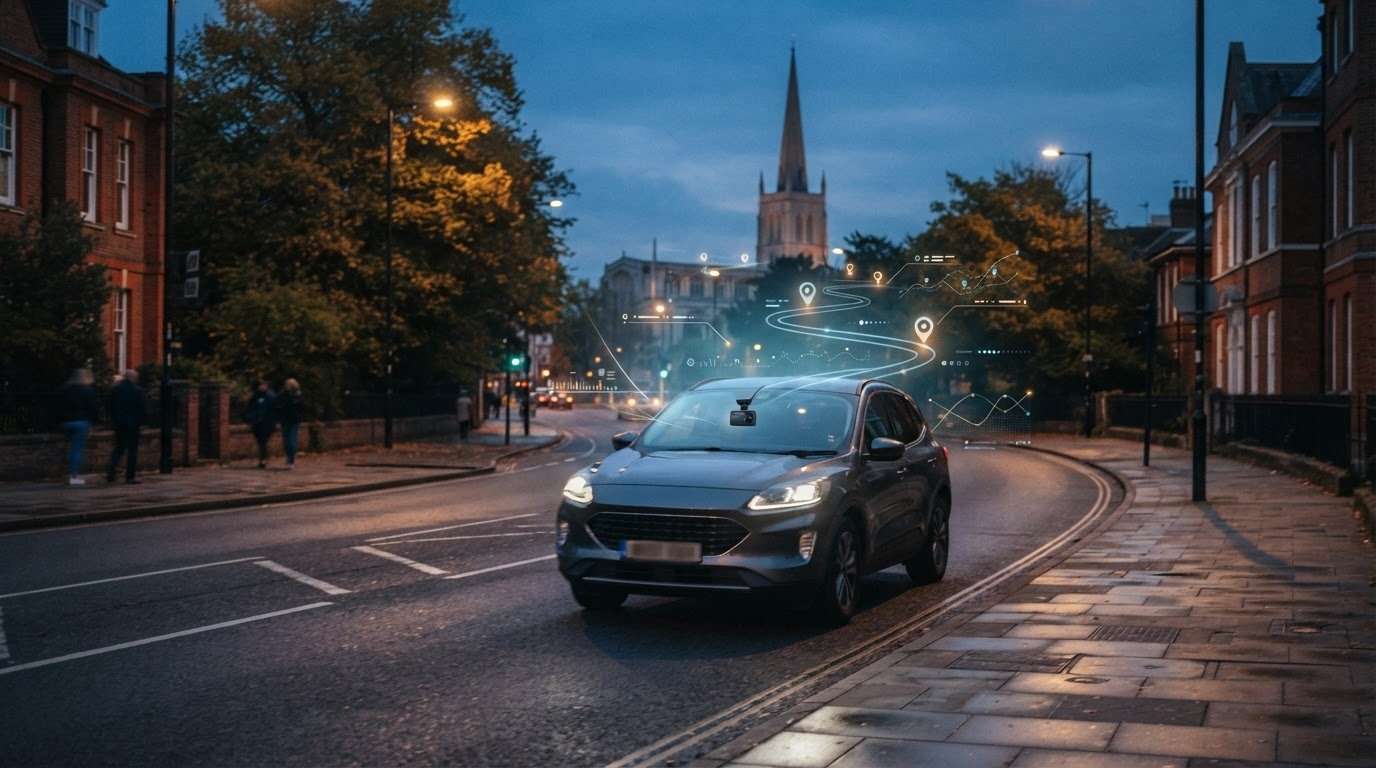
GPS Tracking Dash Cam: What It Tracks and What It Doesn’t in 2026
What It Tracks and What It Doesn’t
Can a GPS tracking dash cam help you find your car if it’s stolen? Not by itself. GPS can add location and journey context to dash cam footage, helping show where an incident happened, but that doesn’t make the camera a dedicated vehicle tracker. This distinction matters when you’re comparing recording features with vehicle security.
If you’re unsure what GPS data your camera captures, or whether it can add useful details to footage, start by separating your needs: do you want a record of a journey, added vehicle security, or both? This guide explains what GPS can add to dash cam recordings and where its role ends.
You’ll also learn how a dash camera differs from a vehicle tracker, what to look for when choosing a system, and how fitting can help bring your setup together. Safe & Sound Mobile supplies and professionally installs dash cameras from Thinkware, Hikvision and BlackVue, as well as insurance-approved S5 and S7 GPS trackers. Its UK-wide mobile fitting service brings installation to your home or workplace, making it practical to combine camera and tracker protection.
Key Takeaways
- A GPS tracking dash cam can link location and journey information to footage, but that does not automatically mean live vehicle tracking.
- GPS-linked details may help you review where and how a journey unfolded after an incident.
- Choose between incident footage, vehicle security, or both, depending on what you need from your setup.
- Compare the specific camera model’s documented GPS and recording capabilities before deciding.
- A professional mobile fitter can help you create a practical camera and tracker setup for your vehicle.
What Does a GPS Tracking Dash Cam Actually Track?
A GPS tracking dash cam can attach location and journey data to recorded video. This can help link footage to a location and a point in the journey, but it doesn’t automatically let you view your vehicle’s live location. The word “tracking” can refer to recorded journey information, not ongoing vehicle monitoring.
GPS uses satellite signals to help calculate a receiver’s position. The Global Positioning System (GPS) Explained provides background on how it works. In a dash cam, supported GPS data may be associated with video so you can review the journey context alongside a clip. The exact data captured and how it appears depend on the camera model.
What GPS data can appear with dash cam footage?
Depending on the model, GPS information may include the vehicle’s location, route, or speed during a journey. Some cameras display this information alongside the video or in a related playback view. Treat these as possible capabilities, not standard features of every camera.
This context can help if an incident happens somewhere unfamiliar. You might remember the road layout or direction of travel but not the exact location. GPS-linked information may help you identify where the recorded event took place and review the footage with that context in mind. Speed data, where available, can add another detail to consider.
Before choosing a camera, check its documented GPS functions. Find out what information it records, where it is displayed and how it relates to saved footage. A camera may record video without offering every GPS data type or display option, so don’t assume a feature described for one model applies to another.
What the word tracking can mean
For a dash cam, “tracking” may refer to GPS information recorded during a journey and linked to footage. That’s different from a dedicated vehicle tracker, which is a separate security product. Recorded route data alone doesn’t mean a camera provides live location access, parked-car monitoring or theft recovery.
GPS dash cam tracking records journey context with footage; a vehicle tracker serves a separate vehicle-security role.
This distinction matters when choosing equipment. If your priority is reviewing an incident, a camera with relevant GPS recording capabilities may add useful location context. If your priority is vehicle security, choose a dedicated tracker rather than relying on a dash cam’s journey records. If you need both, a camera and tracker can serve as complementary, distinct systems.
In short, a GPS tracking dash cam may show where a recorded journey took place and, on some models, provide route or speed information. It doesn’t automatically tell you where the vehicle is now. Base your decision on the model’s stated capabilities and the job you need the system to do.
How GPS Works With Dash Cam Footage During a Journey
GPS can add journey context to a dash cam recording. You drive, the camera records footage, and if the model supports GPS, it may attach location or speed data to that recording. Later, you can review the available details alongside the video. The exact data and how it’s displayed depend on the camera.
The GPS receiver uses satellite signals to establish location. For a plain-language explanation, see the FAA’s explanation of GPS functionality. A dash cam can bring supported GPS information together with its recording for later review. That doesn’t mean you’re automatically watching the vehicle’s live position.
- Drive: The camera records as you travel.
- Record: If GPS is supported and enabled, journey details may be associated with the footage.
- Review: After an event, check the video and any GPS-linked information the camera provides.
Reviewing location and speed information
After an incident, location data may help you determine where a clip was captured, especially if the road or area is unfamiliar. If the camera records speed, a playback view may show it in mph, a familiar unit for UK drivers. Treat that figure as context, not a standalone finding: itdoesn’tt establish what happened or prove who was at fault.
Information and playback options vary between cameras, so use the model’s documentation to understand what you’ll see. GPS-linked details can help you recall a route, but they don’t replace your account of the event or other relevant evidence.
Using footage as an incident record
Review the recording alongside the journey information available. For example, note the clip’s location, direction of travel and any displayed speed, then compare those details with what you remember. Nextbase describes GPS functions that can include route information and road names, but these aren’t universal features. Don’t assume a particular camera will identify a road by name.
Keep the distinction clear: location and speed can add context, while the video shows what the camera captured. Neither guarantees a particular insurance or legal outcome. Consider the full event, your recollection and other relevant information rather than relying on a GPS display alone.
GPS context can help you review dash cam footage, but it doesn’t tell the whole story on its own. If you’re choosing a GPS tracking dash cam, compare the model’s documented recording and GPS functions. Safe & Sound Mobile supplies and professionally fits dash cameras for your vehicle.
GPS Dash Cam vs Vehicle Tracker: Which Function Do You Need?
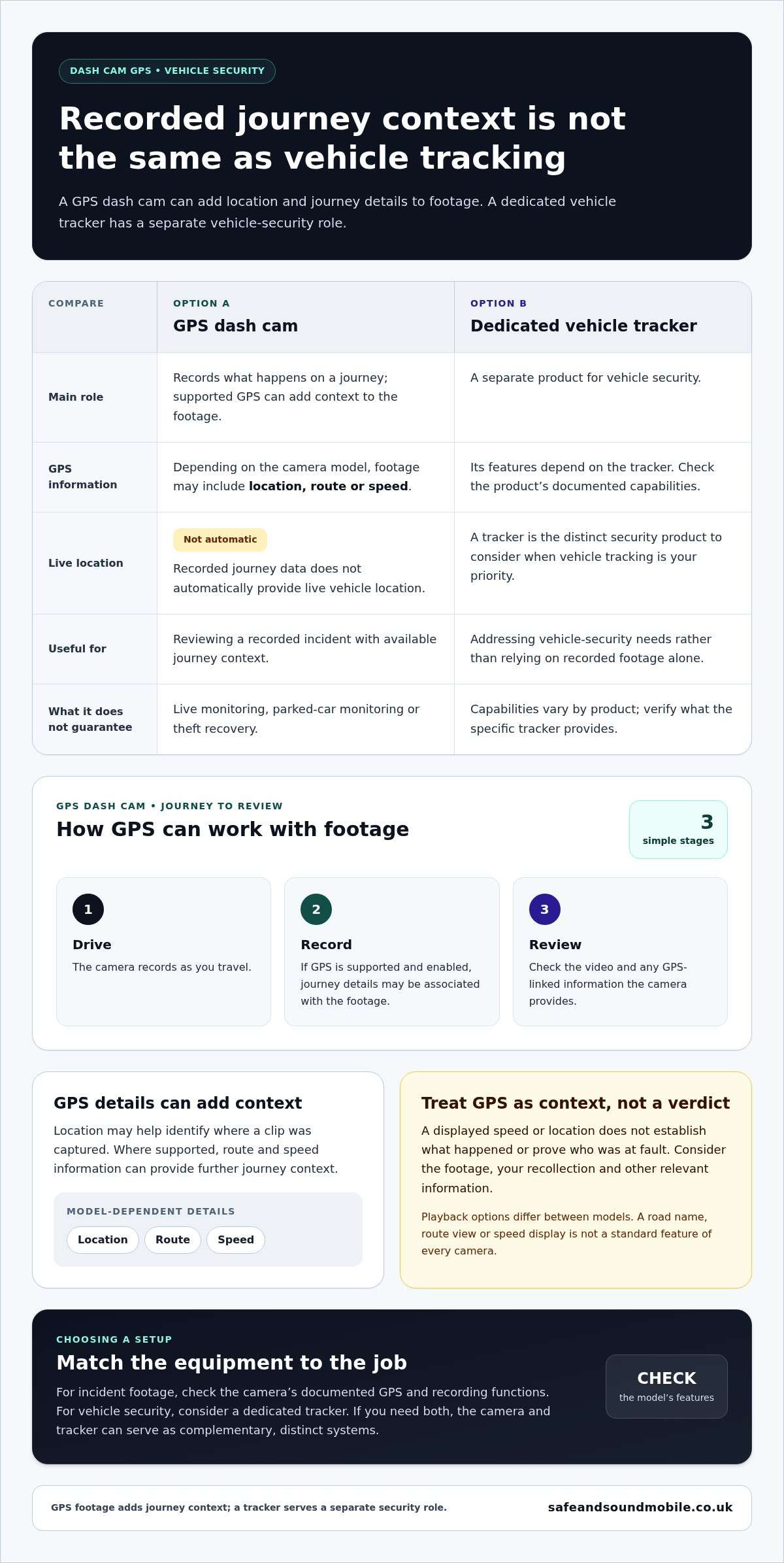
A dash cam and a vehicle tracker serve different purposes. A dash cam records what happens on a journey. Where GPS is supported, it can add journey information to the footage. A dedicated vehicle tracker is a separate security product. The two can complement each other, but a GPS-enabled camera isn’t automatically a tracker.
| Device | Primary purpose | Information or function | Typical need |
|---|---|---|---|
| Dash cam | Record journeys and incidents | Video footage; GPS-linked information varies by camera model | Documenting a journey and reviewing an event |
| GPS vehicle tracker | Vehicle security | Tracker functions depend on the system | Adding a dedicated security device to a vehicle |
When a GPS dash cam may suit your needs
Choose a camera if your main goal is to record journeys and review footage after an incident. GPS may add helpful context, but features vary by model. Check the camera’s stated capabilities rather than assuming every Thinkware, Hikvision, or BlackVue camera records GPS data. A brand name alone doesn’t tell you which GPS functions are included.
Look at what the model records and how you can review that information with the video. This helps you judge whether its capabilities match your needs, without mistaking journey records for vehicle-security features.
When a separate vehicle tracker may be relevant
If your priority is vehicle security rather than recording what happens on the road, a dedicated tracker is a different type of equipment. Safe & Sound Mobile supplies insurance-approved S5 and S7 GPS trackers alongside dash cameras. The S5 has driver identification capability. S7 trackers include professional installation and ongoing monitoring options.
A tracker and camera can be fitted to the same vehicle for distinct purposes: the camera records journeys, while the tracker is a security product. Neither should be treated as a substitute for the other. If you need both, use them as complementary systems.
Choose by purpose: prioritise a camera for journey footage, a dedicated tracker for vehicle security, or both if you need separate protection. When comparing a GPS tracking dash cam with a tracker, focus on the camera’s documented GPS features and the tracker’s stated role. That distinction helps you select equipment for the job you need it to do.
How to Choose a GPS Dash Cam Setup for UK Driving
Start by deciding what the equipment needs to do. A camera records journeys; a dedicated tracker serves a separate vehicle-security purpose. If you need both, treat them as complementary systems, then compare the exact camera model’s documented GPS and recording features.
Match the system to your priority.
- Set your priority. Decide whether you mainly want incident footage, vehicle security or both. This helps prevent GPS on a camera from being mistaken for a tracker.
- Compare camera capabilities. Check the specific model’s documentation for GPS information, recording functions, and how you can review footage. Don’t assume every camera from the same brand has identical features.
- Think about coverage. Consider whether a front-facing view meets your needs or whether you want broader coverage. Compare the recording capabilities of the particular setup rather than relying on a general label.
- Account for your vehicle use. Think about the journeys you make, who uses the vehicle and where recorded footage would be useful. Your routine can help you decide which camera setup is practical.
- Decide if security needs a separate system. If vehicle security is also a priority, consider a camera alongside a dedicated tracker instead of expecting one device to fulfil both roles.
| Function | Intended use | What to verify |
|---|---|---|
| Dash camera | Recording journeys and incidents | Recording coverage and the exactmodel’ss stated GPS features |
| Vehicle tracker | Vehicle security | The tracker’s stated functions and installation arrangements |
| Camera and tracker | Separate recording and security needs | Each device’s role, rather than assuming their features are combined |
Use the table to narrow your options, then check the model details. A GPS tracking dash cam may provide GPS-linked journey information, but its exact functions depend on the camera. Base your comparison on documented features, not assumptions about the product category.
Plan fitting and everyday use.
Consider how the camera will fit into your vehicle and routine. Professional fitting can help integrate a dash cam neatly, and mobile fitting can make installation more practical ifyou’dd prefer to have the system fitted at home or work. Safe & Sound Mobile provides UK-wide mobile installation at either location.
Align your priorities before choosing a setup: the footage you want, the coverage you need, any GPS information that matters, and whether vehicle security needs a separate tracker. Safe & Sound Mobile supplies and professionally installs dash cameras from Thinkware, Hikvision and BlackVue. We arrange professional dash cam fitting to match your vehicle and driving needs.
GPS Dash Cam and Vehicle Security Fitting With Safe and Sound Mobile
A suitable setup starts with a clear purpose. Safe and Sound Mobile supplies and professionally installs dash cameras from Thinkware, Hikvision, and BlackVue, along with insurance-approved S5 and S7 GPS trackers. Camera GPS features vary by model, so choose according to the camera’s documented capabilities and what you need it to record.
Professional fitting combines the equipment and installation. It also lets you explain how you use your vehicle and what you want from the system, whether that’s journey recording, a separate vehicle-security product, or both.
Professional mobile fitting across the UK
Safe and Sound Mobile’s mobile fitting service covers the UK, with installation at your home or workplace. This lets you arrange professional fitting without travelling to a fitting location. Vehicle-specific advice can also help you choose camera and tracker options that match your driving and security priorities.
Customer reviews have highlighted professional, tidy installations. Fitting is part of the overall setup: the equipment needs to be installed in a way that suits your vehicle and intended use. Explain what you want the camera to capture and whether you also want a separate tracker so that the installation can be planned around your requirements.
Choose camera fitting, tracker fitting or both
A dash camera records journeys and incidents. Any GPS information it provides depends on the specific camera model. A vehicle tracker serves a separate security role, so fitting a GPS-enabled camera doesn’t automatically provide tracker functionality. If you want both recording and vehicle security, choose them as complementary systems rather than one device.
Safe and Sound Mobile supplies S5 and S7 trackers as distinct options. The S5 offers driver identification, while S7 trackers provide professional installation and ongoing monitoring options. Tracker products carry a lifetime warranty. This applies to trackers, not dash cameras.
Before arranging a fit, consider your priorities: your journeys, the camera coverage you want, whether model-specific GPS features matter, and whether vehicle security is also a concern. This helps focus the discussion on a setup that suits your needs without assuming every camera offers the same features.
For expert advice on camera or tracker fitting, call Safe and Sound Mobile on 01245 921133 to discuss UK-wide mobile installation at your home or workplace.
Plan Your Next Step with Confidence
Use yourvehicle’ss everyday role to shape your setup. Before deciding, note what you want the camera to capture, which features matter, and whether your priorities extend beyond recording. This gives you a clear starting point for choosing a GPS tracking dash cam or a broader vehicle-security arrangement.
Consider how you want the equipment fitted and used. A practical installation plan can make it easier to move from comparing options to choosing a setup that suits your needs. Keep the camera’s model-specific capabilities in mind, and treat any separate security equipment as part of the decision.
Safe and Sound Mobile can help you consider your requirements and arrange a suitable fitting. Take the next step with expert advice on dash camera and vehicle security fitting.
Choose with clarity, and move forward with a setup designed around your driving.
Frequently Asked Questions
Does a GPS dash cam track my car when it is parked?
GPS on a dash cam usually records journey information rather than providing parked-car location tracking. Some cameras may have separate parking-related functions, but don’t assume these provide live location access. Check the specific camera’s documented capabilities. A dedicated vehicle tracker is a separate security product with its own functions. Neither a camera nor a tracker guarantees vehicle recovery or continuous location access.
Can a GPS dash cam record my speed and location?
Some models can link speed and location data to recorded footage. Depending on the camera, you may see a speed display in mph or location details during playback. Check the model’s specifications and instructions, as data and display options differ. A GPS tracking dash cam can add context when you review a journey, but the recorded information doesn’t independently establish what happened or who was at fault.
What is the difference between a GPS dash cam and a GPS tracker?
A GPS dash cam records driving footage and may link GPS journey details to the recording. A vehicle tracker is a separate security product, not an interchangeable camera feature—Safe and Sound Mobile supplies dash cameras aandinsurance-approved S5 and S7 trackers. Decide whether you need a journey record, a separate security product, or both, then choose each device based on its stated functions.
Is a GPS dash cam useful for an insurance claim?
Footage, along with any GPS context the camera records, may help you recall the circumstances and location of an incident. For example, it could help you identify which part of a journey a clip relates to. Preserve any relevant recording and follow your insurer’s instructions for providing information. Insurers decide how to assess material, so footage doesn’t guarantee acceptance or determine a claim’s outcome.
Do all dash cams from Thinkware, Hikvision and BlackVue have GPS?
No. GPS features depend on the specific camera model, so don’t assume them based on the brand name. Safe and Sound Mobile supplies dash cameras from Thinkware, Hikvision, and BlackVue, but you should consider GPS capabilities model by model. Compare the stated specifications and recording features of the camerayou’ree considering. This helps you choose based on documented functions rather than assumptions about a manufacturer’s entire range.
Can I have a GPS dash cam and an insurance-approved tracker fitted to my car?
Yes, you can choose a dash camera and a separate tracker if you want both journey footage and a dedicated security product. They remain distinct devices, even when fitted to the same vehicle. Safe and Sound Mobile supplies dash cameras and S5 and S7 trackers, with UK-wide mobile installation at home or work. Explain how you use your vehicle to help plan a fitting that suits your needs.
About author
Related posts
A dash cam’s recording time depends on its memory card and video quality. For a single-camera setup, a 32GB card stores around 2 to 4... Continue reading
Could choosing the wrong tracker category leave your insurer’s requirement unmet? The right thatcham approved tracker installation uk starts with the... Continue reading
Real-Time GPS Tracking Chelmsford: Cars, Vans and Fleets Real-time GPS tracking can help vehicle owners and businesses in Chelmsford view location information through a supported... Continue reading
Thatcham Tracker Categories: S5, S7 and Older Labels Thatcham tracker categories can be confusing if your paperwork mentions Category 3, Category 5 or Category 6.... Continue reading
Tracker Insurance Discount: 7 Essential Checks for UK Drivers A tracker insurance discount is not automatic. Fitting a certified vehicle tracker may meet an insurer’s... Continue reading